


A strong brand kit is more than a folder of logos and color codes. It is the heart of a company’s visual identity. It gathers every essential element from typography and imagery to design templates so that every piece of content looks and feels consistent. When a team shares the same set of brand assets, designers, marketers, and developers can create campaigns faster and with complete confidence that the brand’s look will never drift off course.
The challenge is keeping that kit organized and current as a brand grows. Fonts change, color palettes evolve, and marketing channels multiply. Without the right tools, assets get scattered across email threads or old hard drives, slowing projects and risking off brand work.
In this guide you will discover the most effective tools to create and maintain a complete brand kit. These platforms simplify asset storage, streamline collaboration, and make updates effortless so your brand stays consistent everywhere it appears.
Understanding the Core of a Brand Kit
A brand kit is the single source of truth for every visual and stylistic element that defines your brand identity. It gathers the logo files, color palette, fonts, imagery, icons, and any supporting design templates in one organized place. When these assets are documented and easy to find, your team can produce marketing materials, presentations, and product designs that always match your brand’s personality and voice.
A well maintained brand kit offers more than convenience. It helps marketing and design teams stay aligned, saves time during content creation, and protects your brand from inconsistency. Clear guidelines inside the kit show exactly how to use each asset so that anyone creating content, whether an in house designer or an external partner, can represent your brand correctly.
By understanding these core elements and keeping them updated, you create a strong foundation that supports every campaign and strengthens audience recognition.
Key Features to Look for in Brand Kit Tools
Choosing the right platform for building and maintaining a brand kit starts with understanding the features that keep your assets organized and accessible. Look for these essentials when evaluating tools.
Centralized storage and easy access
All brand files should live in one secure location so team members and partners can find them quickly. A searchable library saves time and eliminates confusion.
Real time collaboration
Designers, marketers, and developers often need to work on the same assets. A tool with real time editing and commenting keeps everyone in sync and reduces back and forth emails.
Version control and approvals
Brands evolve. Features like version history and approval workflows ensure that only the latest approved logos, fonts, and templates are in use while older files remain archived for reference.
Integrations with creative software
Connecting with design platforms such as Adobe Creative Cloud, Figma, or Canva allows teams to pull assets directly into their projects without downloading and reuploading files.
Strong permissions and security
Protecting your brand means controlling who can view, edit, or share assets. Tools with detailed permission settings and secure sharing links help maintain brand integrity.
These core features provide the structure needed to keep your brand kit consistent, updated, and easy to use across every channel.
Tools to Maintain Your Brand Kit
Keep your brand assets organized and easy to update with these powerful platforms.
Each tool below helps teams stay consistent and ensures every design reflects your brand identity.
Brandy – All in One Brand Management Platform

Brandy provides a complete space to store and organize every visual asset of your brand. You can upload logos in multiple formats, set up color palettes, add typography guidelines, and create reusable templates. Its instant brand guidelines feature ensures that updates appear across all shared links the moment you make a change, so every team member or client always works with the latest files.
Brandy supports unlimited brand spaces and lets you control access with detailed permissions, making it perfect for agencies that manage multiple clients. The platform’s clean interface and visual previews help designers, marketers, and developers quickly find the assets they need. Sharing is effortless through secure links, and collaborators can view or download files without extra software. Brandy simplifies every step of brand management and keeps your identity consistent across campaigns, presentations, and digital platforms.
Canva Brand Kit

Canva makes brand management simple by combining design tools with a built-in brand kit. Teams can upload custom fonts, set brand colors, and create ready-to-use templates for social media, presentations, and marketing materials. Whenever someone starts a new design, the chosen colors, typography, and logos appear automatically, ensuring a consistent look without extra effort. Real time collaboration lets multiple users edit and comment on projects at once, making it easy for designers and marketers to work together.
Canva’s cloud-based system means you can access your brand kit from anywhere, whether on a desktop or mobile device. The intuitive interface suits beginners and experienced creators alike, so no specialized design skills are required. By centralizing all brand elements in one easy dashboard, Canva helps businesses maintain visual identity while speeding up content creation for every campaign.
Adobe Express Brand Manager
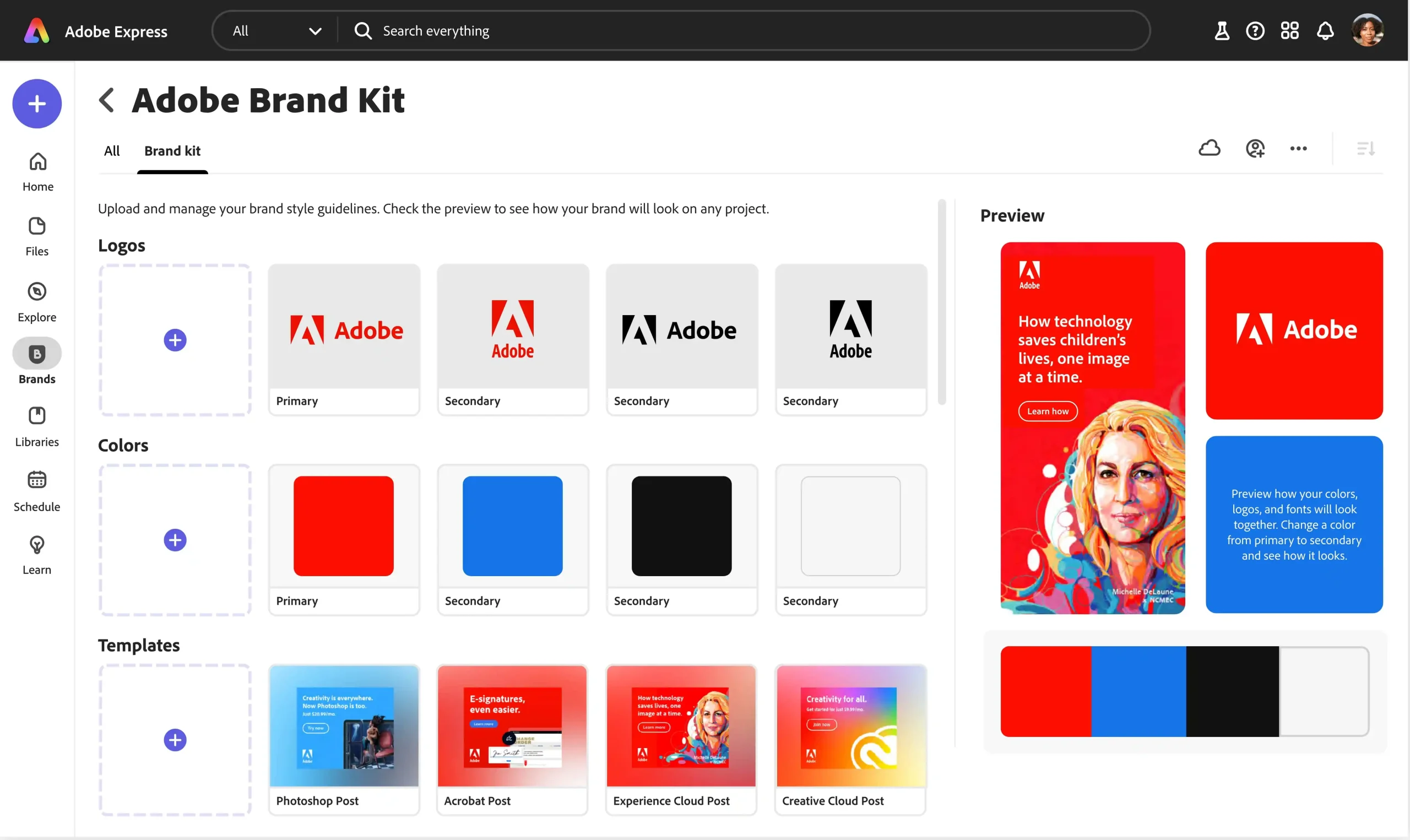
Adobe Express offers an integrated brand manager that links seamlessly with the wider Adobe Creative Cloud ecosystem. Teams can store logos, color palettes, and typography settings while designing graphics, social posts, and marketing materials directly inside the platform. Because Adobe Express is cloud-based, updates to brand elements appear instantly for every user, ensuring that each project reflects the latest guidelines.
Designers can take advantage of Adobe’s professional-grade editing tools while marketers enjoy simplified templates and quick export options for different formats and channels. The platform also supports shared libraries, making it easy to distribute approved assets across departments or external partners. Whether you are creating a quick social graphic or a detailed promotional campaign, Adobe Express provides a reliable environment to keep brand visuals consistent, secure, and easy to update without complex workflows or multiple storage solutions.
Frontify
Frontify is designed for organizations that need advanced brand governance and collaboration. It combines digital brand guidelines, asset libraries, and project management features in one platform. Teams can create detailed style guides covering logos, typography, colors, and tone of voice, then share them through interactive web links that update in real time. Frontify supports granular permission controls, so you can decide who can edit, approve, or simply view assets.
Its integration with tools like Figma, Sketch, and Adobe Creative Cloud allows designers to pull resources directly into their workflows. Marketing teams can use Frontify to manage campaigns and ensure every piece of content meets brand standards. With scalable architecture, it works equally well for small creative teams and large enterprises managing multiple sub-brands. By uniting guidelines, collaboration, and asset storage, Frontify keeps brand identity strong and consistent across every touchpoint.
Figma

Figma is a collaborative design platform that doubles as a powerful brand management solution. Teams can create shared libraries containing colors, typography, icons, and reusable components, ensuring that every project reflects the approved visual identity. Because Figma operates entirely in the cloud, updates to design elements appear instantly across all linked files, so designers and developers always work with the latest assets. Real time editing and commenting streamline feedback and reduce the need for endless file versions. Its developer handoff features let engineers access CSS code, fonts, and measurements directly, speeding up production while maintaining visual accuracy.
Figma also integrates with popular tools such as Slack and Notion for smoother cross-team collaboration. Whether you are designing websites, apps, or marketing graphics, Figma provides a single source of truth that keeps branding consistent and accessible to everyone involved in the creative process.
Tips to Keep Your Brand Kit Updated and Relevant
A brand kit is only valuable when it reflects the latest version of your identity. Schedule a review every few months to check that colors, fonts, and logos match your current branding and remove outdated files. Involve marketing, design, and product teams in each review so every department provides input on what needs to change or stay the same.
Create a simple approval process for adding new assets so only verified files make it into the kit. Track customer feedback and industry trends to decide when visual elements should evolve. Keep clear documentation inside the kit that explains how to use each asset, and update these instructions whenever a new format or platform is added. By treating the brand kit as a living resource rather than a static folder, you ensure every campaign stays consistent and your visual identity always feels fresh and recognizable.
Conclusion
A well maintained brand kit is the foundation of a consistent and memorable identity. By organizing logos, fonts, colors, and templates in a central space, you make it easier for every designer, marketer, and partner to create materials that match your brand perfectly.
Using dedicated tools such as Brandy, Canva, Adobe Express, Frontify, and Figma keeps your assets secure and always up to date. Regular reviews and clear guidelines ensure that each campaign, presentation, or product launch reflects the latest version of your brand. Start setting up or refreshing your brand kit today to save time, avoid confusion, and present a unified image across every channel.

