


In today’s digital-first business world, content is currency – and organizations are producing more of it than ever before. From product images and brand videos to marketing decks and sales collateral, digital assets are the backbone of modern marketing, communication, and operations. But as the volume and complexity of digital content grow, so does the challenge of managing it efficiently.
Digital Asset Management is no longer a “nice-to-have” for enterprises – it’s a strategic necessity. Without a centralized system to store, organize, retrieve, and distribute digital assets, teams waste hours hunting down files, duplicate work, and risk publishing outdated or off-brand content. The result? Delays, inefficiencies, and missed opportunities across departments.
A robust DAM system offers a single source of truth for all digital content. It streamlines creative workflows, boosts collaboration, improves brand consistency, and ensures marketing assets are always accessible and up to date. Whether you’re a global enterprise or a fast-growing startup, digital asset management can transform how your organization handles content.
In this complete guide, we’ll cover everything you need to know about digital asset management from its definition and features to real-world use cases, implementation steps, and future trends. By the end, you’ll understand why DAM is one of the most critical tools for scaling content operations in 2026 and beyond.
Ready to see DAM in action? Start organizing your brand assets with Brandy free, no credit card required.
What Is Digital Asset Management?
At its core, a DAM platform functions as a content command center, helping businesses bring structure to their growing library of digital content. These digital files or digital assets can include everything from logos and marketing images to training videos, brand guidelines, product PDFs, and creative files.
A modern DAM solution typically includes features such as:
- Metadata tagging for easy categorization and searchability
- AI-powered search to locate assets instantly
- User roles and permissions to control access
- Version control to track updates and prevent outdated file usage
- Automated workflows to streamline approvals and content delivery
Unlike basic file storage tools like Google Drive or Dropbox, a DAM system is specifically built for managing rich media at scale, supporting collaboration across departments, and ensuring brand consistency across every customer touchpoint.
Whether you’re managing thousands of product photos for an e-commerce site or distributing marketing materials across regional teams, digital asset management empowers your organization to maximize the value of your content while minimizing chaos.
What Is a Digital Asset?

A digital asset is any content that exists in a digital format and has value to your organization. These assets are typically used to support branding, marketing, sales, training, and communication efforts across various platforms and channels.
In simpler terms, if it’s a digital file you use regularly and it contributes to your business goals it’s a digital asset.
Common Types of Digital Assets:
- Images & Photographs – Product photos, event pictures, lifestyle shots
- Videos – Explainer videos, social clips, advertisements, training content
- Audio Files – Podcasts, voiceovers, background scores
- PDFs & Documents – Ebooks, case studies, sales decks, whitepapers
- Brand Elements – Logos, color palettes, fonts, icons, and templates
- Creative Files – Adobe Photoshop, Illustrator, InDesign files
- 3D & CAD Files – Used in architecture, manufacturing, and product design
- Rich Media – Interactive banners, animations, and web-based assets
Each of these assets holds operational, marketing, or legal value, which makes their storage, access, and usage highly strategic.
What distinguishes digital assets from regular files is their role in representing your brand or communicating with your audience. That’s why managing them effectively through a Digital Asset Management (DAM) system is so crucial especially as the number and size of these files grow over time.
By organizing digital assets properly, companies can reduce duplication, ensure brand consistency, and unlock more value from the content they’ve already created.
Types of Digital Assets Managed in DAM
A modern Digital Asset Management (DAM) system is built to handle a wide variety of asset types not just standard image or video files. As content needs evolve, organizations rely on DAM platforms to store, organize, and distribute everything from simple brand logos to complex media assets used in campaigns, e-commerce, and product launches.
Below are the most common types of digital assets a DAM system can manage:
1. Images and Photos
High-resolution product shots, lifestyle imagery, event photos, and stock images are core to every brand’s visual identity. DAM systems store them with metadata for easy retrieval and usage across campaigns.
2. Videos
From promotional videos and commercials to training modules and customer testimonials, video files are often large and complex. DAM tools help teams manage versions, preview clips, and convert formats on the fly.
3. Audio Files
Podcasts, music beds, interviews, and voiceovers can be stored, tagged, and distributed through DAM especially useful for media, marketing, and production teams.
4. Documents & PDFs
Ebooks, brochures, manuals, and presentations often hold key business information. With DAM, these files are easy to search, version, and share securely.
5. Brand Guidelines & Design Assets
Logos, typography files, color codes, style guides, and brand templates ensure consistent branding across channels. DAM acts as a central source of truth for these crucial assets.
6. Creative & Design Files
Assets built in Adobe Photoshop, Illustrator, InDesign, or Figma are stored in DAM for creative collaboration, version control, and approvals reducing back-and-forth between design and marketing teams.
7. 3D, CAD, and Rich Media
Manufacturers, architects, and product designers often use complex file types. DAM platforms can store and preview CAD files, 3D models, and interactive media like banners or animations.
How Does a Digital Asset Management System Work?

A digital asset management system works as a centralized platform that helps businesses organize, store, retrieve, and distribute their digital assets more efficiently. It streamlines how teams handle content across departments, ensuring that valuable files are easy to find, use, and share without versioning issues or scattered storage.
At its core, a digital asset management system functions like a smart library for your content. But unlike traditional file storage, it’s specifically built to handle large volumes of visual and brand assets, making content workflows faster and more reliable.
Here’s how a digital asset management system typically works:
1. Asset Ingestion
The first step is uploading digital files into the DAM platform. A good digital asset management system allows bulk uploading of assets from various sources cloud drives, hard disks, or legacy systems while maintaining folder structure and metadata.
2. Metadata Tagging
Once uploaded, assets are tagged with metadata such as keywords, file type, usage rights, and campaign tags. Advanced digital asset management systems even use AI-powered auto-tagging and optical character recognition (OCR) to enrich metadata automatically.
3. Centralized Organization
Assets are stored in a centralized repository, allowing teams to sort files into folders, collections, or brand portals. This ensures that everyone from marketing to sales can access what they need from one trusted location.
4. Advanced Search & Retrieval
One of the key benefits of a digital asset management system is its powerful search capability. With metadata, AI search, and even facial recognition, teams can locate the exact file they need in seconds regardless of the asset library’s size.
5. Collaboration & Workflow Management
DAM systems support collaborative workflows, allowing users to add comments, request approvals, and manage version control all within the platform. This eliminates email chains and reduces time to market.
6. Access Control & Security
A digital asset management system includes role-based permissions, allowing teams to restrict or grant access to specific assets. Features like digital rights management (DRM) ensure content is used appropriately and in compliance with licensing agreements.
7. Distribution & Publishing
From embedding assets on websites to creating shareable download links or publishing across digital channels, a DAM system simplifies distribution. Some platforms also integrate with CMS, PIM, and eCommerce tools for seamless publishing.
8. Performance Analytics
Leading digital asset management systems provide insights into asset usage helping teams analyze what’s working and guiding future content strategies. You can track downloads, user behavior, and even engagement trends.
Key Features of Digital Asset Management Software
Digital asset management (DAM) is the system organizations use to store, organize, retrieve, and distribute digital files, like logos, images, videos, and brand guidelines, from one secure, searchable location. It’s a comprehensive content operations hub designed to streamline workflows, protect brand assets, and maximize the value of digital content across teams.
Modern DAM software goes well beyond basic file storage. If you want to try one before committing, here are the best free digital asset management software options worth testing first.
Below are the most important features that make digital asset management software a game-changer for businesses of all sizes:
1. Centralized Asset Repository
At the heart of digital asset management software is a centralized library where all digital files images, videos, PDFs, brand kits, and more – are stored. This eliminates the chaos of scattered folders and makes content accessible from a single location.
2. AI-Powered Search and Metadata Tagging
Finding content is fast and intuitive with features like:
- Auto-tagging using AI
- Optical Character Recognition (OCR) for scanned documents
- Facial recognition for images
With metadata fields like keywords, categories, and usage rights, teams can locate any asset in seconds.
3. User Permissions and Access Control
Digital asset management software allows administrators to set granular access levels based on roles, teams, or projects. This ensures sensitive assets are protected while still allowing easy access for collaborators and partners.
4. Version Control and Asset History
Keep your assets up to date without losing historical data. DAM software offers:
- Version stacking (multiple iterations of a file under one record)
- Audit trails for transparency
- Notifications for when assets are updated or approved
5. Approval Workflows and Collaboration Tools
Many digital asset management platforms include built-in workflows that automate review and approval processes. Users can:
- Leave comments and annotations
- Route files for approval
- Set deadlines and task assignments
6. Digital Rights Management (DRM)
With digital rights management features, businesses can control licensing, expiration dates, and usage rights. This prevents unauthorized use of assets and ensures legal compliance especially for media-heavy industries.
7. Custom Portals and Sharing Tools
Digital asset management software makes it easy to share collections of content through:
- Branded portals
- Secure download links
- Embed codes for websites or eCommerce platforms
8. Content Analytics and Reporting
Track asset performance and engagement using built-in analytics dashboards. Discover which files are used most, who’s downloading them, and how they’re impacting marketing ROI.
Benefits of Using Digital Asset Management Tools

As businesses scale and digital content becomes more central to marketing, sales, and communication, the need for efficient content operations is greater than ever. That’s where digital asset management tools offer a transformative advantage.
These tools go beyond traditional file storage by providing structure, automation, and control allowing teams to work smarter, not harder. Here’s a look at the most impactful benefits of using digital asset management tools:
1. Faster Content Retrieval
No more digging through endless folders or emailing coworkers for that “final_final_v2” file. Digital asset management tools offer powerful search capabilities, including AI, metadata filtering, and preview options, so assets can be found and used in seconds.
2. Improved Collaboration Across Teams
Marketing, design, product, and sales teams can all work from the same platform streamlining feedback loops, automating approvals, and minimizing version confusion. DAM tools eliminate silos and reduce dependency on email or chat-based communication for asset sharing.
3. Consistent Branding
With a centralized library of logos, templates, and visual assets, digital asset management tools help maintain brand consistency across campaigns, platforms, and regional teams. Approved assets are always up to date and ready to deploy.
4. Enhanced Productivity and Workflow Efficiency
Creative and marketing teams save hours each week thanks to features like:
- Automated file tagging
- Content versioning
- Pre-built approval workflows
This efficiency means faster time-to-market for campaigns and product launches.
5. Controlled Access and Rights Management
Set permissions based on user roles to control who can view, edit, or download specific assets. Digital asset management tools also help manage copyright licenses and expiration dates, reducing legal risk and content misuse.
6. Content Lifecycle Management
DAM platforms support the entire content lifecycle from creation and collaboration to publishing and archiving. You can even automate the expiration of outdated files and update links across platforms when assets are refreshed.
7. Higher ROI on Content Investments
Digital content creation is expensive. DAM tools ensure every asset is stored, reused, and repurposed to its fullest potential, increasing content longevity and return on investment.
Who Needs DAM? Use Cases by Teams & Industries
Digital Asset Management isn’t just for large corporations or creative teams it’s a scalable solution used across departments, industries, and business sizes. From improving internal workflows to accelerating marketing execution, digital asset management use cases are broad and impactful.
Let’s explore how different teams and industries benefit from using DAM systems.
By Team: Digital Asset Management Use Cases
1. Marketing Teams
Marketing professionals rely on a constant flow of content ads, banners, presentations, product sheets, and more. A digital asset management system gives them quick access to brand-approved assets and automates campaign workflows, reducing time-to-market.
2. Creative & Design Teams
Designers work with large files and need tight control over versions. DAM helps them manage Adobe Creative Cloud files, collaborate with stakeholders, and ensure creative assets remain consistent and secure.
3. Sales Teams
Salespeople need access to product images, brochures, presentations, and training materials. DAM platforms enable them to find the latest sales collateral fast without relying on marketing or design teams.
4. Content & Editorial Teams
Writers, editors, and content strategists use DAM to organize ebooks, whitepapers, blog visuals, and editorial assets. This ensures messaging stays aligned across channels while simplifying access to design support.
5. IT and Operations Teams
IT departments manage the implementation and security of the DAM platform. They ensure integrations with existing tech stacks and enforce access control, DRM, and compliance policies.
By Industry: Digital Asset Management Use Cases
1. Retail & E-commerce
Retailers manage thousands of product images and promotional visuals. DAM helps streamline content delivery across eCommerce platforms, marketplaces, and marketing campaigns.
2. Agencies & Creative Studios
Agencies use DAM to manage client work, pitch decks, and branded visuals. It helps them maintain quality, speed, and professionalism across multiple clients.
3. Media & Entertainment
From video archives to broadcast-ready assets, media companies use DAM to organize vast media libraries and enable rapid content retrieval and reuse.
4. Higher Education
Universities and institutions store lectures, course materials, and branded assets. A DAM system ensures content is well-structured and accessible to faculty and students.
5. Healthcare & Pharma
DAM platforms help maintain compliance by organizing patient-facing brochures, medical imagery, and training content under strict access permissions.
6. Manufacturing & Industrial
From CAD files to instructional videos, manufacturers use DAM to manage product content and ensure consistent use across global teams and partners.
Popular Digital Asset Management Software Platform
As the volume of digital content explodes, businesses are relying on digital asset management software platforms to bring structure, consistency, and speed to their content workflows. Whether you’re managing branded visuals, marketing campaigns, or product media, the right DAM solution can transform how your organization operates.
Here are some of the top DAM platforms available today, starting with one of the most intuitive and fast-growing players in the market.
1. Brandy
Brandy is a modern, beautifully simple digital asset management platform designed for teams that want quick access to brand assets without complexity. It’s ideal for startups, creative teams, and agencies looking for a fast, easy-to-use solution that supports brand consistency at scale.
Key Features:
- Instant brand asset access through sharable kits
- Lightning-fast search and smart folders
- Drag-and-drop uploads with auto-formatting
- Unlimited brand kits on the Pro plan
- Free to use
- White label options for agencies managing multiple client brands
- Built-in brand governance tools to keep every asset on-brand
2. Canto
Canto is a user-friendly, cloud-based digital asset management platform with strong visual organization and intuitive search. It’s a favorite among marketing and creative teams that need quick deployment and ease of use.
Key Features:
- AI-based image recognition
- Branded portals and galleries
- Metadata-driven search
3. Bynder
Bynder is a comprehensive DAM solution built for enterprise needs. It combines digital asset management with brand automation and creative project workflows, making it a powerful tool for scaling content operations.
Key Features:
- Brand templates and creative automation
- Workflow management tools
- Cloud-native architecture
4. Brandfolder
Brandfolder combines ease of use with advanced performance analytics and sharing features. It’s designed to help teams maintain brand consistency while enabling flexible, secure collaboration.
Key Features:
- Smart CDN distribution
- Custom user roles and permissions
- Asset usage reporting and analytics
5. Adobe Experience Manager Assets
Adobe’s DAM offering is deeply integrated with Adobe Creative Cloud, making it a natural choice for enterprise teams using tools like Photoshop, Illustrator, and InDesign. It’s highly customizable and scalable.
Key Features:
- Native Adobe integration
- Scalable for high-volume media
- AI-driven metadata management
Future Trends in Digital Asset Management
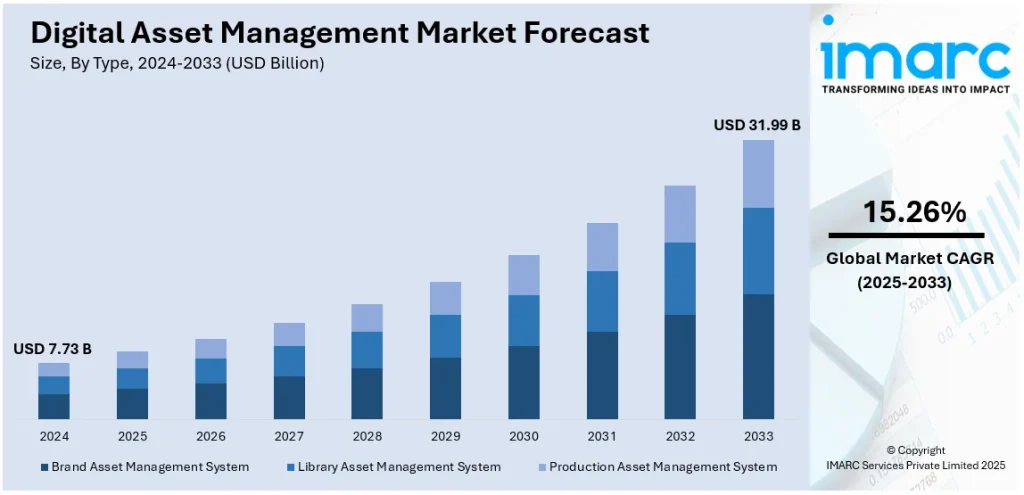
As content demands grow and technology evolves, so do the capabilities of digital asset management systems. From artificial intelligence to real-time integrations, the future trends in digital asset management are focused on making content faster, smarter, and more scalable for teams across every industry.
If you’re investing in DAM, understanding where the industry is headed can help future-proof your strategy.
1. AI-Powered Visual Search & Tagging
Gone are the days of manual tagging. Artificial intelligence is revolutionizing how assets are organized and retrieved. Modern DAM platforms are using AI to:
- Auto-tag images and videos based on content
- Use facial recognition to identify people in media
- Recognize objects, text, and even emotions within visuals
This makes finding the right asset faster and eliminates hours of manual metadata work.
2. Headless DAM for Omnichannel Publishing
As businesses publish across more channels (web, mobile, social, eCommerce), headless DAM systems are emerging. These platforms separate the content repository from the front-end experience allowing assets to be delivered anywhere via API.
Why it matters: You can dynamically publish approved assets to any platform without duplicating content or using third-party tools.
3. DAM and PIM Integration
Product Information Management (PIM) and DAM are converging. Brands are integrating these two systems to manage rich media and product data side by side, enabling faster product launches and consistent omnichannel experiences.
Use case: Update a product image in DAM, and it automatically reflects across product listings, catalogs, and marketplaces.
4. Built-In Content Delivery Networks (CDNs)
To speed up global access, more DAM platforms are embedding CDN capabilities. This allows teams to distribute content faster, optimize load times, and ensure brand assets perform well across geographic regions.
Especially useful for: E-commerce sites, global campaigns, and multimedia content delivery.
5. Creative Workflow Automation
The future of DAM includes tighter integration with project management tools and creative workflows. Expect to see:
- Automated approval chains
- Task-based asset routing
- Content scheduling tied to campaigns
This allows creative and marketing teams to collaborate inside the DAM itself without switching platforms.
6. Advanced Analytics and Asset ROI
DAM systems are evolving from simple storage solutions to performance-driven platforms. Future-ready DAMs will offer:
- In-depth asset usage analytics
- Engagement data by team, campaign, or asset
- Insights to improve creative production and content strategy
Why it matters: You’ll know which assets drive results and which need to be retired or optimized.
7. Stronger Emphasis on Privacy & Compliance
As data privacy regulations (like GDPR and CCPA) continue to evolve, DAM providers are adding features to help businesses manage compliance. Look for better digital rights management (DRM), audit logs, and role-based controls.
8. User-Centric, Minimalist Interfaces
Usability is no longer optional. The best DAM platforms are focusing on intuitive, clean interfaces that require little to no training. Expect to see more user-first design, guided onboarding, and minimal click paths.
Conclusion: Is Digital Asset Management Right for Your Business?
If your organization is creating, sharing, or storing digital content effective digital asset management is not just a convenience, it’s a necessity. From streamlining workflows to ensuring brand consistency, a DAM system brings structure, speed, and control to the ever-growing world of digital content.
Whether you’re a startup managing logos and social media visuals or an enterprise coordinating global marketing campaigns, the benefits of digital asset management are clear:
- Faster access to assets
- Improved collaboration
- Stronger brand governance
- Higher content ROI
- Reduced production waste
Implementing a DAM system allows teams to move with confidence knowing the right content is always available, up to date, and being used effectively. It’s not about managing files; it’s about unlocking the full value of your content.
So, is a digital asset management solution right for your business?
If you’re struggling with scattered assets, duplicated work, or delayed campaigns, the answer is yes. Investing in a DAM platform today sets the foundation for smarter, scalable, and more efficient content operations tomorrow.
Related DAM Guides
Explore more digital asset management topics:
- Digital Asset Management vs Brand Asset Management (DAM vs BAM)
- DAM vs SharePoint: Choosing the Right Platform
- CMS vs DAM: Key Differences
- EDM vs DAM: Which System Truly Supports Brand Growth
- Complete Guide to Enterprise DAM Migration
- Global DAM for Modern Enterprises
- DAM Scalability: 8 Questions Every Brand Should Ask
- DAM RFP Best Practices
- How to Name Your DAM System
- How to Manage Social Media Assets With a DAM Platform
- AI Content Moderation in DAM
- Building a Digital Shelf Advantage with DAM for CPG Brands
- Why You Should Connect Your CMS With a DAM
- Top Misconceptions About AI in DAM
FAQs on Digital Asset Management
Digital asset management (DAM) is the process of storing, organizing, and sharing digital content such as images, videos, and documents in a centralized system.
A digital asset is any file with value to a business, including images, logos, PDFs, videos, audio files, design templates, and more.
Marketing teams, designers, content creators, sales teams, agencies, and enterprises across industries use DAM to streamline content workflows and maintain brand consistency.
A DAM system organizes assets with metadata, enables secure sharing, supports collaboration, and automates approvals all from a centralized platform.
Yes. Most DAM platforms offer role-based access control, encryption, audit trails, and digital rights management (DRM) to protect your content.
Absolutely. DAM platforms support video and audio file storage, tagging, preview, distribution, and even format conversion.
DAM is built for rich media management, with advanced search, metadata, version control, and brand governance features not offered by basic cloud storage tools like Google Drive.
No. A CMS manages web content and publishing, while DAM manages and organizes digital assets behind the scenes. Many businesses integrate both.
Consider your team’s size, content volume, required features, integrations, and budget. Tools like BrandyHQ are ideal for speed and simplicity, while enterprise platforms offer deeper functionality.
Challenges include poor metadata practices, low user adoption, scattered migration, and lack of governance all solvable with proper planning and onboarding.

