
Notion has become one of the most popular tools for creating brand guidelines. It is flexible, accessible, and most teams already use it for other internal documentation. Starting your brand guidelines in Notion is a sensible choice.
This guide covers how to properly structure brand guidelines in Notion, what to include, and how to recognize when your brand has outgrown Notion’s capabilities.
How to Structure Brand Guidelines in Notion
A well-structured Notion brand guidelines page covers the same core elements regardless of what tool you use: logo, colors, typography, brand voice, and usage rules. The structure matters as much as the content. A page that is hard to navigate will not be used, no matter how thorough it is.
Here is a recommended structure that works for most teams.
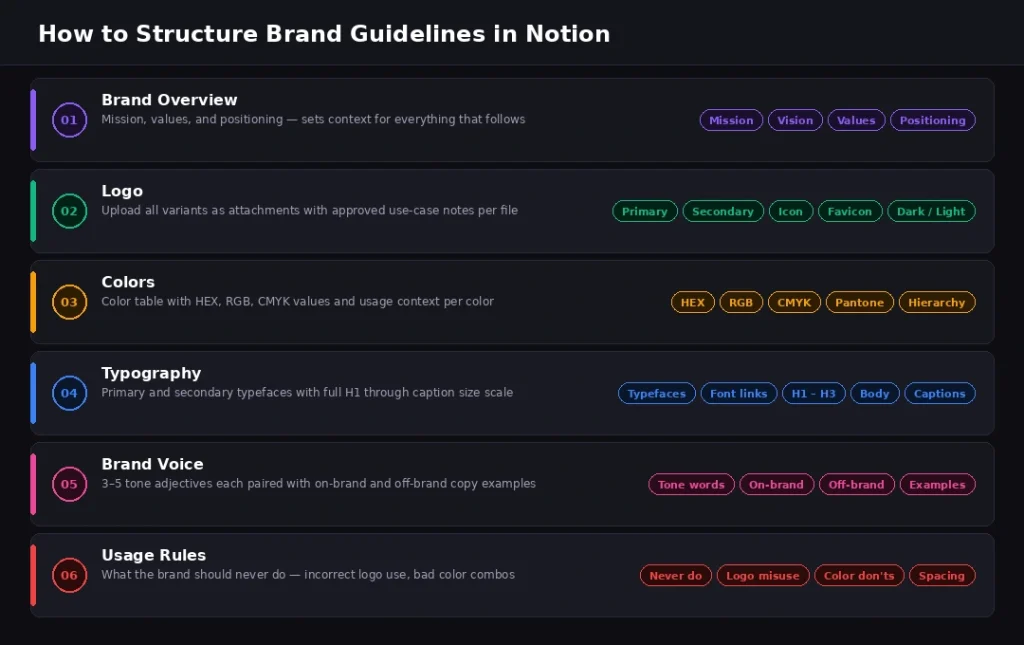
Brand Overview
A short summary of the brand covering mission, values, and positioning. This section sets context for everything that follows and answers the question a new designer, content creator, or agency partner would ask first: what is this brand trying to be, and who is it for?
Keep this section to a single page or toggle block. It should be readable in under two minutes.
Logo
Upload your logo files as attachments. Include the primary logo, secondary logo, icon, and favicon. For each variant, add a text note covering the approved use cases: when to use the dark version, when to use the light version, minimum size requirements, and approved backgrounds.
Do not rely on the file name to communicate this context. A file called “Brandy_Logo_Dark_SVG_2026.svg” tells someone what it is. A text note alongside it tells them when and how to use it.
Colors
List each brand color with its hex code, RGB values, and CMYK values. Include a note on color hierarchy: which colors are primary, which are secondary, and which are accent. A Notion table with a column for each value type works well here.
Add a column for usage context. For example, the primary color is used for headlines and CTAs. The secondary color is used for backgrounds. This context is what separates a useful color reference from a list of numbers.
Typography
Name the primary and secondary typefaces. Include a link to the font source if it is a Google Font or an Adobe Font. Note size recommendations for headings, body text, and captions, along with any weight or spacing rules.
One common gap: many brand guidelines document the typeface but not the hierarchy. Specify which font is used for H1, H2, body copy, and captions so there is no interpretation required.
Brand Voice
Three to five adjectives that describe the brand’s tone, each paired with a short explanation and a side-by-side example of on-brand versus off-brand copy. This section is consistently useful for content creators and is consistently skipped by teams that underestimate the extent of inconsistency caused by unclear voice guidance.
A single well-chosen example is worth more than a paragraph of description. Show what the brand sounds like, not just what it aspires to be.
Usage Rules
What the brand should never do. Incorrect logo usage examples. Color combinations to avoid. Typography misuses that appear often enough should be addressed explicitly.
This section saves hours of revision. Every rule documented here is a conversation that does not need to happen later.
What Notion Does Well for Brand Guidelines?
Notion has real strengths for brand documentation, which is why so many teams choose it as a starting point. Understanding what works well makes it easier to use Notion effectively and to recognize when its strengths are no longer enough.

It is Already Where Your Team Works
If your internal wiki, project management, and meeting notes are in Notion, adding brand guidelines there reduces the number of tools people need to check. Discoverability in Notion is good when the team already uses it daily. The brand guidelines page does not need to compete for attention because it lives inside the same workspace where people are already spending their time.
It is Easy to Maintain
Updating a Notion page requires no technical knowledge. Any team member with edit access can update color values, swap logo file attachments, or revise brand voice guidelines without involving a designer or developer. For teams without dedicated brand managers, this accessibility is genuinely valuable.
It is Free for Small Teams
Notion’s free plan is generous. For startups and small teams building their first brand guidelines document, Notion is a practical, zero-cost option that produces a functional result. The investment is time, not budget.
It is Searchable
Notion’s search works well within a workspace. Team members can find brand guidelines without knowing exactly where they are stored, which matters as a workspace grows and pages multiply.
For internal use within a small, trusted team, Notion brand guidelines work well. The problems emerge when brand needs become more complex.
The Limits of Notion for Brand Management
As your brand and team grow, Notion’s limitations as a brand management tool become more significant. Each limitation is manageable at a small scale. Together, they create a system that consistently falls short of professional brand management standards.
Assets Are Attachments, Not Brand Assets
In Notion, logo files are file attachments. They have no visual context, no download format options, and no usage notes integrated with the file itself. A vendor downloading your logo from a Notion attachment gets a file with a filename. A vendor accessing your brand space in a dedicated tool gets the right file in the right format with usage guidance attached.
The difference between those two experiences is between a brand that is used correctly and one that is not.
No Visual Brand Display
Notion displays colors as text: hex codes in a table or a colored block at best. There are no color swatches, no visual palette, and no professional brand presentation. Typography is listed as text, not shown rendered in context. A new team member reading your Notion brand guidelines understands the brand intellectually but cannot see it.
A brand guidelines platform built for brand management visually shows the brand, which is how brand understanding actually forms.
External Sharing Creates Exposure Risk
Making a Notion page public shares your entire Notion workspace structure in the sidebar. Guests with page access may see more of your workspace than you intend. For agencies sharing brand assets with clients, or for teams with sensitive internal documentation in the same workspace, this is a meaningful professional concern.
No White Label or Branded Experience
When you share a Notion page with a client, they see Notion. There is no way to present brand guidelines under your agency’s brand or your client’s brand. The tool that holds your client’s brand identity is visually branded by a third party.
No Permissions at the Asset Level
In Notion, access is controlled at the page level. You cannot give a vendor permission to download logos while restricting access to brand voice guidelines on the same page without creating separate pages for each use case. As the number of stakeholders and permission requirements grows, the page structure becomes increasingly difficult to manage.
Signs Your Brand Has Outgrown Notion
These are the clearest signals that your brand guidelines have moved beyond what Notion can sustainably provide. If two or more of these apply, a dedicated platform will solve real problems immediately.
External Stakeholders Regularly Request Assets
When vendors, agencies, or partners frequently ask for logo files, color codes, or fonts, the issue is usually that your Notion page is too complex for them to navigate or that it requires access you are not comfortable granting. A request for a logo file that should take 30 seconds is taking an email exchange and a file attachment.
You Are Managing More Than One Brand
Multi-brand management in Notion means separate pages, separate workspaces, or increasingly complex nested structures. There is no central brand overview, no dashboard, and no efficient way to switch between client brands without navigating folder structures that grow harder to maintain with each new addition.
Brand management for agencies requires a platform built for managing multiple brands simultaneously, not a workaround based on nested Notion pages.
Brand Consistency is Still a Problem
If you have brand guidelines in Notion and brand consistency is still a recurring issue, the problem is likely discoverability and presentation. People are not finding or using the guidelines because Notion does not make them immediately accessible and visually clear to everyone who needs them.
Documentation that requires effort to read and interpret does not get used consistently.
You Want to Present Guidelines Professionally to Clients
For agencies, a Notion page is internal documentation. It is not a client deliverable. Clients expect a professional brand experience, not a link to an internal wiki page that looks like your meeting notes and project tracker.
Your Team is Growing Quickly
The more people who need to reference brand guidelines, including new hires, contractors, and partner agencies, the more important it becomes to have them in a format that is immediately clear and requires no explanation. Onboarding someone to a Notion brand guidelines page often involves someone else walking them through it. A dedicated brand space is self-explanatory.
What Does a Dedicated Brand Guidelines Platform Provide?
A brand asset management platform replaces the Notion workaround with a purpose-built solution. The difference is not incremental. It is structural.
Visual Asset Display
Logos are displayed visually with all variants: primary, secondary, icon, and favicon. Each variant shows download options for SVG, PNG, and JPG in a single interface. No hunting through attachments, no questions about which format is appropriate. The right file is one click away for anyone with access.
Colors appear as visual swatches with hex, RGB, CMYK, and usage labels displayed together. Your entire color palette is immediately understandable to anyone who sees it, without needing to read a table of numbers.
Typography is shown rendered in context, not as a list of font names. Font pairings are visible. The usage hierarchy, which font for which level, is clear at a glance.
Professional External Sharing
The entire brand space is accessible via a single URL. Share it with vendors, clients, or new team members. They see exactly what you want them to see, presented professionally, without accessing your internal workspace or requiring a Notion account.
Multi-Brand Management for Agencies
Brandy supports unlimited brand spaces, one per client, all managed from a single dashboard. Each client gets their own dedicated brand environment with its own URL, assets, and permission structure. Switching between clients takes a single click.
Moving from Notion to a Brand Asset Management Platform
Moving your brand guidelines from Notion to a dedicated platform does not require starting over. The content already documented in Notion is the foundation. The migration is a refinement, not a rebuild.
Setting Up Your Brand Space
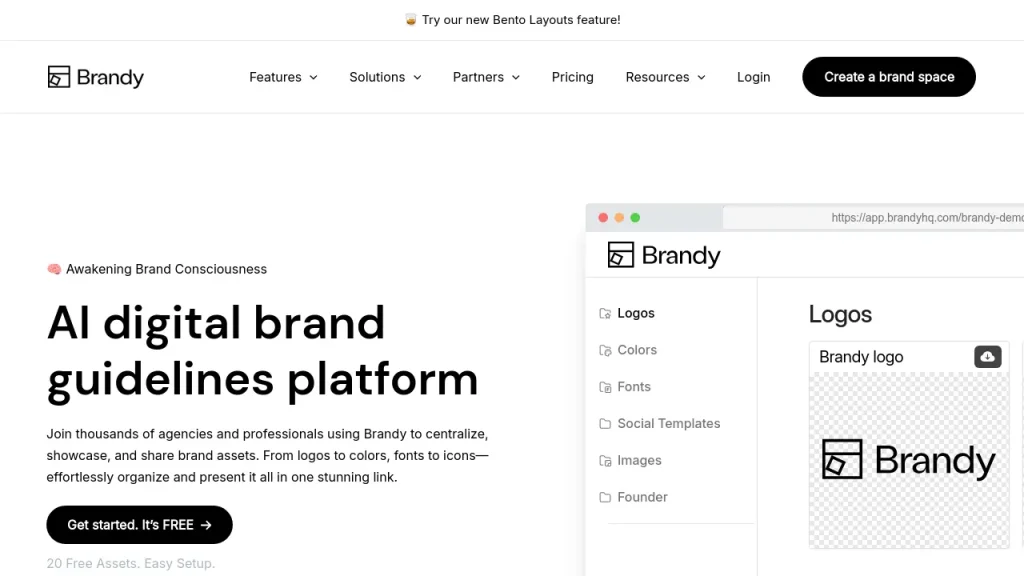
Start by creating a brand space in Brandy. Upload your logo files in all formats. Add your color palette with the values already documented in your Notion page. Upload your fonts. Paste your brand voice guidelines into the guidelines section.
Most teams complete this setup in under an hour for a single brand. The result is a professional brand space with a shareable URL that replaces the Notion page for all external brand asset needs.
Keeping Both Tools
Many teams continue to use Notion for internal brand strategy, campaign planning, content calendars, and team notes. Brandy becomes the external-facing brand asset hub. Both tools do what they were built to do, and neither is being asked to do something it was not designed for.
The Notion page becomes the internal reference. The Brandy brand space becomes what you share with the outside world.
Final Thoughts
Notion is a practical starting point for brand guidelines. With the right structure, it serves small teams and early-stage brands well. The structure outlined in this guide will produce brand documentation that is genuinely useful and significantly better than no documentation at all.
As your brand grows, a dedicated brand asset management platform provides what Notion cannot: visual brand display, professional external sharing, multi-brand management, and a brand space that reflects the quality of the brand it represents.
Brandy is free to start. Build your first brand space in under five minutes and see the difference immediately.
Ready to move your brand guidelines beyond Notion? Start a free Brandy brand space in under five minutes. Start Free