
Brand Management Blog & Resources
Artwork is no longer just a design task. For modern brands, it sits at the intersection of compliance, speed, collaboration, and brand trust. As teams scale across regions and products move faster from concept to shelf, managing artwork casually creates real business risk.
The artwork management software market reached USD 0.6 billion in 2023 and is expected to grow to USD 1.4 billion by 2033. Regulated industries such as pharmaceuticals, food and beverage, cosmetics, and FMCG drive this growth, where artwork accuracy directly impacts legal compliance and financial risk.
A single label error can delay launches, trigger recalls, or damage customer trust. At the same time, creative teams are expected to work faster, collaborate globally, and maintain consistent branding across hundreds or thousands of assets.
This is why artwork management systems have moved from being nice to have tools to essential infrastructure. The right platform does more than store files. It brings structure, visibility, accountability, and control to the entire artwork lifecycle.
What Is Artwork Management and Why It Matters Today
Artwork management is the structured process of creating, reviewing, approving, storing, and distributing artwork assets across teams and stakeholders. It ensures that every piece of artwork is accurate, approved, compliant, and aligned with brand guidelines before it reaches the market.
Unlike basic file storage tools, artwork management platforms are built around workflows. They track versions, approvals, feedback, and ownership so teams always know which artwork is current and which one is not.
This matters because artwork rarely lives in one team. Designers, marketers, regulatory teams, legal reviewers, agencies, and external partners all touch the same files. Without a centralized system, versions get mixed up, feedback is lost, and approvals slow down.
Artwork management systems solve this by creating a single source of truth. Everyone works from the same files, follows the same process, and sees the same status at every stage.
Industries Where Artwork Accuracy Is Mission Critical
Artwork management is especially critical in industries where mistakes carry high consequences. Pharmaceutical and life science companies must meet strict labeling regulations. Food and beverage brands deal with allergens, nutrition data, and regional compliance. Cosmetics and personal care brands manage ingredient disclosures and packaging claims.
FMCG brands face a different challenge. High volumes of packaging updates, frequent product launches, and multiple markets increase the risk of inconsistencies. In all these cases, artwork accuracy is not optional. It is a requirement.
The Real Cost of Poor Artwork Processes
When artwork processes break down, the impact is immediate. Approvals slow down. Teams duplicate work. Incorrect versions get used. Compliance checks happen too late.
The result is missed deadlines, reprints, wasted spend, and sometimes product recalls. Over time, these issues erode trust inside the organization and with customers.
Key Features That Separate Good Artwork Tools From Great Ones
Not all artwork management tools work the same way. The best platforms support real world creative and regulatory workflows instead of acting as simple file storage.
Centralized Artwork Library With Version Control
A strong artwork library ensures that every approved file lives in one place. Version control prevents teams from accidentally using outdated artwork and makes it easy to trace changes over time.
Structured Review and Approval Workflows
Great artwork tools replace messy email threads with clear review stages. Reviewers know when they are needed, what is expected, and where to leave feedback. This alone can cut approval time dramatically.
Compliance and Label Accuracy Checks
For regulated industries, compliance features are essential. Automated checks catch missing information, incorrect claims, or formatting errors before teams finalize artwork.
Clear Audit Trails and Activity Visibility
Audit trails provide transparency. Teams can see who approved what and when. This visibility reduces risk and improves accountability across departments.
Brand Guideline Access for Distributed Teams
Brand guidelines only work if people can find and follow them. The best tools connect artwork directly to approved brand assets and rules, ensuring consistency across markets and teams.
Best Artwork Management Tools in 2026 Compared
The tools below were selected based on real world usability, feature depth, scalability, and relevance for modern creative and brand teams. Each platform serves a slightly different audience, from brand driven marketing teams to compliance heavy enterprises.
Brandy
Artwork Management Built for Brand Consistency at Scale
Brandy is designed for teams that care deeply about brand accuracy, visibility, and control. Rather than focusing only on approvals or packaging workflows, Brandy brings artwork management into the broader context of brand governance.

It helps teams manage approved artwork, logos, templates, and creative assets in a way that prevents misuse and reduces friction across departments.
Why Brandy Stands Out in 2026
Brandy focuses on clarity. Teams know which artwork is approved, which version is current, and where it can be used. Brand portals make it easy for internal teams, partners, and agencies to access the right assets without back and forth.
By combining artwork access with brand rules, Brandy reduces the risk of outdated or off brand assets slipping into campaigns. This is especially valuable for distributed teams and fast growing brands.
Best For
Marketing teams, creative teams, agencies, and brand led organizations managing multiple stakeholders and channels.
Core Artwork Management Capabilities
Brandy offers centralized artwork storage, version history, access control, and brand safe sharing. Teams can organize assets by brand, campaign, or region and ensure everyone works from approved files.
The platform also supports controlled distribution, which means teams can share artwork confidently without losing control over how it is used.
Esko
Enterprise Grade Packaging and Artwork Workflows

Esko is a well known platform in packaging and labeling environments. It is built to handle complex artwork workflows where multiple systems, formats, and compliance requirements intersect.
Esko WebCenter digitizes the artwork lifecycle from briefing to pre press, helping large organizations standardize packaging operations.
Key Strengths
Esko excels in structured workflows and packaging specific use cases. It supports role based access, automated pre press tasks, and content reuse across packaging variants. Teams can track feedback, assign responsibilities, and maintain consistency across product lines.
Limitations to Consider
Esko is powerful but can feel heavy for teams that do not need deep packaging automation. Smaller teams or marketing focused organizations may find it complex to implement and maintain.
Artwork Flow
Compliance Focused Artwork Operations
Artwork Flow is built for teams that need strong compliance and approval controls, particularly in regulated industries. It focuses on speeding up approvals while reducing labeling and regulatory risk.

The platform brings together design, regulatory, and packaging teams into a single workflow.
What It Does Well
Artwork Flow offers automated compliance checks, flexible workflows, and detailed analytics. Teams can build rule sets to catch errors early and track progress across projects. Online proofing tools help reduce human error during reviews.
Who It Is Best For
Pharmaceutical, food, cosmetics, and FMCG brands where label accuracy and regulatory compliance are critical.
4. Filestage
Fast Review and Approval for Creative Teams
Filestage helps teams simplify artwork reviews without adding unnecessary complexity. It focuses heavily on proofing, feedback, and approvals rather than full scale artwork operations or compliance heavy workflows.

For many creative teams, especially marketing and content teams, the biggest bottleneck is feedback. Filestage addresses this by making reviews visual, structured, and easy to follow.
Strengths in Review Workflows
Filestage allows reviewers to comment directly on files, leave clear annotations, and approve or reject artwork in one place. Teams can customize review stages to involve the right people at the right time. Automatic reminders help keep approvals moving and reduce follow ups.
Version tracking ensures teams always know which file is current and which feedback applies to which version.
Where It Falls Short
While Filestage is excellent for reviews, it is not a full artwork management system. Teams that need deep compliance checks, packaging workflows, or brand governance may need additional tools alongside it.
5. GoVisually
Creative Proofing With Client Friendly Collaboration
GoVisually is designed with agencies and client facing teams in mind. It focuses on reducing approval cycles by making collaboration simple and transparent for both internal teams and external stakeholders.
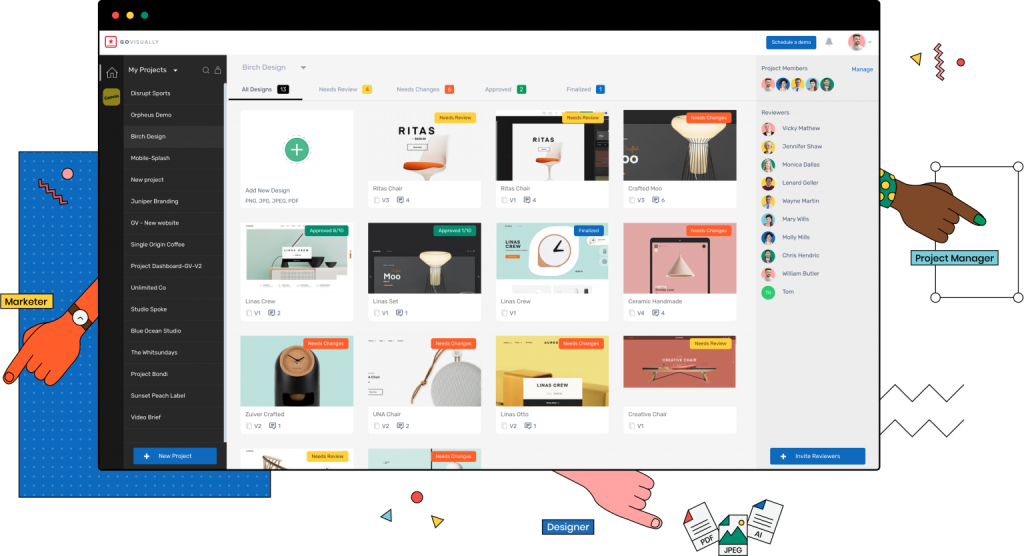
The platform is especially popular with design agencies that manage frequent feedback loops.
Key Use Cases
GoVisually centralizes artwork files so teams can manage versions, comments, and approvals in one place. Markup tools allow reviewers to leave precise feedback, attach files, and track revisions clearly.
Integrations with tools like Slack help keep everyone informed without switching platforms constantly.
Ideal Team Size and Setup
GoVisually works best for small to mid sized creative teams and agencies that prioritize speed and simplicity over complex compliance workflows. It is less suited for heavily regulated industries.
6. Kallik
Artwork Management for Regulated Supply Chains
Kallik is a cloud based platform designed specifically for regulated industries. It focuses on managing label and artwork lifecycles while ensuring compliance across global supply chains.
The platform is commonly used by pharmaceutical and consumer goods organizations.
Compliance First Capabilities
Kallik supports real time collaboration across teams while maintaining visibility and control. Automated compliance checks help teams stay aligned with changing regulations. Centralized access reduces inconsistencies across markets and regions.
Complexity Considerations
Kallik is powerful but not always intuitive for new users. Teams often require training to use the platform effectively. Some organizations also find parts of the system rigid compared to more modern interfaces.
7. Loftware
Labeling and Artwork Control for Growing Brands

Loftware is a cloud based labeling and artwork management platform aimed at small and mid sized businesses. It helps teams standardize artwork processes while improving collaboration and visibility.
Where Loftware Fits Best
Loftware works well for organizations that need structured labeling workflows without enterprise level complexity. It supports approvals, version control, and stakeholder collaboration in a centralized environment.
Known Challenges
Some teams report challenges when migrating artwork from older systems. Certain barcode and technical parameters may also require additional setup or clarification.
How to Choose the Right Artwork Management Tool for Your Team
Choosing an artwork management platform is not about finding the tool with the longest feature list. It is about finding the one that fits your workflow, industry, and team structure.
Start by identifying your biggest pain points. Are approvals slow. Are versions getting mixed up. Is compliance a constant concern. Or is brand inconsistency the real issue.
Questions to Ask Before You Buy
- Do you need compliance checks or just faster reviews?
- Will external partners access your artwork?
- How many people are involved in approvals?
- Do you manage multiple brands or regions?
- Do you need brand guidelines tied directly to assets?
Clear answers to these questions will narrow your options quickly.
Red Flags to Watch For
- Overly complex interfaces
- Limited visibility into approvals
- Weak version control
- Lack of brand governance features
- Poor onboarding support
Final Thoughts
Artwork Management Is a Competitive Advantage
Artwork management is no longer just an operational concern. It directly impacts speed to market, brand trust, and regulatory confidence. Teams that manage artwork well move faster, make fewer mistakes, and protect brand integrity at scale.
In 2026, the most effective artwork management tools are those that balance structure with usability. Platforms like Brandy stand out by combining artwork access, brand control, and clarity without overwhelming teams with unnecessary complexity.
Choosing the right system is not about replacing creativity. It is about removing friction so creative teams can focus on doing their best work.
Frequently Asked Questions
Artwork management software is a centralized platform that helps teams create, review, approve, store, and distribute artwork efficiently. It provides version control, approval workflows, and visibility to ensure accuracy and consistency across all artwork assets.
The best tool depends on your needs. Brand driven teams benefit from platforms like Brandy. Regulated industries often prefer compliance focused tools like Artwork Flow or Kallik. Creative teams may choose Filestage or GoVisually for faster approvals.
Yes. Digital asset management focuses on storing and organizing files. Artwork management adds structured workflows, approvals, compliance checks, and accountability across the artwork lifecycle.
Any organization managing multiple artworks, approvals, or stakeholders benefits from artwork management. This includes brands, agencies, manufacturers, and regulated industries.

