
In digital marketing, what you cannot measure, you cannot improve. That is exactly why SEO reporting plays such a powerful role in shaping strategies that drive real results. Whether you are working on a content campaign, improving technical performance, or presenting results to a client, having the right tools in place turns data into actionable insight.
SEO reporting is not just about checking keyword rankings or traffic numbers. It is about understanding how people are finding your website, how they are engaging with your content, and where your biggest opportunities lie. Without clear visibility, even the best campaigns can lose momentum.
The good news is that there are plenty of tools available that simplify this process. From visual dashboards to keyword tracking and technical audits, the right platform can give you clarity, speed, and confidence in your SEO work. In this guide, we will explore the most effective SEO reporting tools that help you uncover what is working, spot what is not, and keep your strategy moving forward.
Let us dive into the tools that help you measure what really matters in search.
What to Look For in an SEO Reporting Tool
Not all SEO tools are created equal. Before choosing one, it helps to know what features really matter based on your goals, whether you are working solo, managing a team, or delivering client reports.
Here are a few things to consider when picking an SEO reporting tool that fits your needs:
1. Simple and customizable dashboards
A good reporting tool should give you a clear view of your SEO performance at a glance. You should be able to customize the layout to highlight the metrics that matter most to you or your team.
2. Easy integration with key platforms
Look for tools that sync easily with Google Analytics, Google Search Console, and your favorite marketing platforms. This ensures you get complete, up-to-date data from one place.
3. Accurate keyword and ranking insights
Whether it is tracking keywords you already rank for or finding new opportunities, a reliable tool should offer both high-level trends and detailed keyword performance over time.
4. Backlink and competitor analysis
Seeing how your site compares to others in your niche can guide your strategy. A strong tool will help you spot gaps in your backlink profile and track your position in the market.
5. Report automation and exporting options
Time-saving features like automated reports, PDF or CSV export options, and branded templates make it easier to share insights with clients or stakeholders.
6. Visual clarity and action-focused suggestions
A tool should not just show you numbers. It should help you understand what the numbers mean and what to do next to improve your search engine rankings, speed, or content performance.
Top SEO Reporting Tools Every Marketer Should Try
The right SEO reporting tool can do more than just track progress. It can give you the clarity to make smart decisions, fix issues before they become problems, and uncover new ways to grow. Below are some of the most trusted tools in the SEO world, each with its own strengths depending on your goals, team size, or technical level.
SEMrush

SEMrush is one of the most comprehensive SEO platforms on the market. It offers tools for keyword tracking, backlink monitoring, technical audits, and competitor analysis, all from one place. Its reporting features are especially useful for agencies and marketing teams.
Why it works:
- Detailed site audits with SEO health scores
- Keyword position tracking across multiple locations and devices
- Backlink analytics and toxic link detection
- Custom report builder with branded templates
If you want an all-in-one tool that supports every stage of the SEO process and delivers professional-level reports, SEMrush is a great choice.
Google Analytics 4 and Google Search Console

These two free tools from Google are the foundation of any SEO reporting setup. Google Analytics 4 gives you deep insights into how users find and interact with your website, while Search Console focuses on how your site performs in Google search results.
What they help with:
- Tracking organic sessions, bounce rates, and user behavior
- Measuring clicks, impressions, and keyword positions
- Identifying technical issues like mobile usability or crawl errors
- Monitoring how well specific pages perform in search
Together, they offer a full view of your SEO health and give you the data needed to optimize performance and prove ROI. You can even connect both tools to Looker Studio for easy reporting.
Ahrefs

Ahrefs is another powerhouse tool in the SEO space, best known for its backlink database and in-depth keyword research capabilities. It is often used by content marketers and technical SEO professionals alike.
Top features:
- Site Explorer for tracking organic keywords, traffic, and backlinks
- Site Audit tool for identifying technical SEO issues
- Rank Tracker to monitor your keyword positions over time
- Content Gap analysis to find keyword opportunities you are missing
Ahrefs also allows easy report exports, making it simple to share data and insights across your team or with clients.
Looker Studio

Formerly known as Google Data Studio, Looker Studio is a powerful data visualization tool that turns raw SEO data into beautiful, shareable reports. It integrates directly with GA4, GSC, and many third-party tools, letting you create real-time dashboards that are easy to read and update.
Why marketers love it:
- You can build custom dashboards for different campaigns or clients
- Reports can be branded and shared with just a link
- It supports blending data from multiple sources for a complete view
If you want to create reports that are both detailed and easy to understand, Looker Studio is a must.
Moz Pro

Moz Pro offers a balanced mix of features for on-page optimization, keyword tracking, and link analysis. It is especially beginner-friendly thanks to its clean interface and straightforward reporting tools.
Key benefits:
- Keyword explorer with SERP analysis and ranking difficulty
- Link Explorer for discovering new backlink opportunities
- On-page grader to identify areas for content improvement
- Weekly and monthly reports with customizable metrics
For marketers who want solid SEO insights without overwhelming complexity, Moz Pro is a solid option.
Screaming Frog SEO Spider

Screaming Frog is a technical SEO tool that crawls your entire website just like a search engine. It provides a detailed look at your site’s structure and performance, helping you uncover SEO issues quickly.
What it uncovers:
- Broken links, redirects, and duplicate content
- Missing title tags, meta descriptions, or header tags
- Page depth and internal linking structure
- Canonical tag issues and crawlability problems
This tool is perfect for SEOs who want to go deeper into audits and create actionable reports for developers or web teams.
Sitechecker
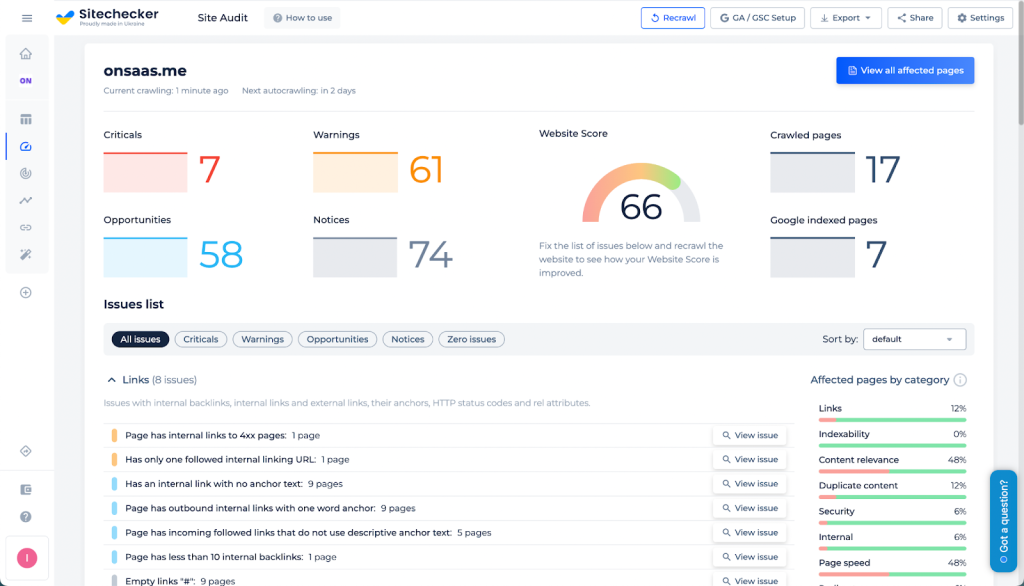
Sitechecker is an all-in-one SEO reporting software built for website owners, marketers, and SEO specialists who want clear and actionable data. It combines essential features like keyword research, rank tracking, and automated reports with a broader set of tools for deep website optimization.
What makes it stand out:
- Analyze multiple websites at once with ease
- Track keyword rankings and keyword density metrics
- Run detailed SEO audits, including page speed and HTML tag optimization
- Review backlinks, internal linking, and overall website health
Sitechecker also offers scheduled reports and intuitive dashboards, making it a great choice for those managing multiple websites or running SEO services for clients.
KWFinder by Mangools

KWFinder is a user-friendly keyword research tool designed to help you find low-competition terms with high search potential. It is perfect for marketers who want fast, visual insights and clean exports for reporting.
What stands out:
- Clear difficulty scores and search volume trends
- SERP overview to analyze who ranks for your target keyword
- List export features for keyword planning and content briefs
- Keyword questions tab to uncover search intent
KWFinder makes it easy to show clients or managers why a keyword matters and how it can support growth.
Unbounce Landing Page Analyzer

Although Unbounce is known for creating landing pages, its Landing Page Analyzer is a free and helpful tool for evaluating SEO performance from a user experience perspective.
What it provides:
- SEO, mobile speed, and security scores
- Message match evaluation for content relevance
- Recommendations for improving trust signals and load times
- Visual and color-coded priority suggestions
It is ideal for marketers focused on conversion optimization, showing how user experience affects SEO in real ways.
PageSpeed Insights
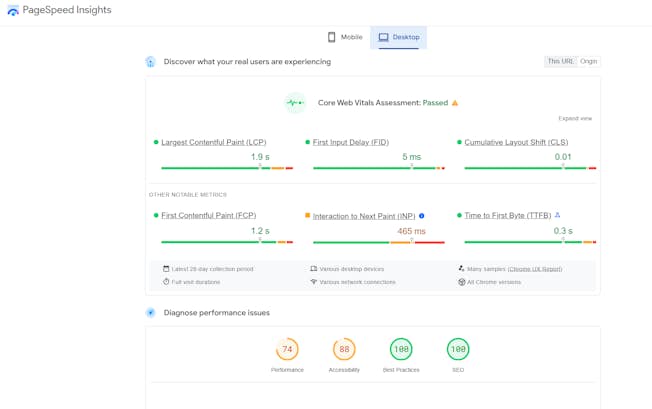
Page speed is a direct ranking factor, and Google’s PageSpeed Insights helps you understand exactly how fast your pages load on both mobile and desktop. It offers a quick yet deep dive into technical performance.
Why it matters:
- Core Web Vitals scoring with clear visuals
- Real-world and lab performance data
- Actionable suggestions for image optimization, script loading, and caching
- Focuses on improving both SEO and UX
Faster websites rank better and retain users longer. This tool helps you get there with data-backed improvements.
Click Insights

Click Insights is a user-friendly SEO reporting tool developed by the award-winning agency Click Intelligence. It is built for transparency, making it easy to track SEO results through clear, well-organized monthly reports.
Why it works well:
- Connects with Google Search Console and GA4 to show real-time SEO data
- Offers a clean dashboard showing keyword movements, engagement rate, and site activity
- Includes tabs for content audits and even AI-generated overviews
- Ideal for agencies offering white-label SEO services, as reports can include your own logo and brand colors
Click Insights is a strong option for SEO agencies managing multiple clients who need visually polished, data-rich reports without the complexity. It simplifies the reporting process while keeping insights clear, current, and aligned with campaign goals.
Additional SEO Reporting Software That Are Worth Exploring
While the tools above offer everything from keyword tracking to technical audits, there are a few others that deserve attention. These additional tools can complement your main stack or serve as lightweight alternatives depending on your SEO goals and team size.
SpyFu
SpyFu is a great tool for competitive intelligence. It allows you to see which keywords your competitors rank for, what ads they run, and where they are getting traffic.
What makes it useful:
- Competitor keyword tracking and backlink analysis
- Historical data on ranking trends and ad campaigns
- Easy-to-read reports for strategy comparisons
Ideal for marketers who want to uncover hidden keyword opportunities and benchmark against rival websites.
Serpstat
Serpstat is an affordable all-in-one SEO platform, especially suitable for startups or small teams. It covers keyword research, rank tracking, and website audits with a clear interface.
Standout features:
- Domain analysis and keyword clustering
- Backlink tracking with update frequency
- Custom reports and white-label exports
If you are looking for a budget-friendly tool with wide functionality, Serpstat is a solid choice.
SE Ranking
SE Ranking is built with agencies in mind. It provides detailed SEO insights along with white-label reporting features, making it easy to present results to clients under your own branding.
Why agencies love it:
- Keyword tracking, website audits, and on-page checks
- Social media tracking and local SEO features
- Easy-to-schedule automated reports
Its pricing and flexibility make it especially popular among freelancers and small agency teams.
BrightEdge
BrightEdge is an enterprise-level SEO platform that uses AI-powered insights to drive large-scale optimization. It is often used by global brands and large marketing departments.
What it brings:
- Performance tracking across search, content, and social
- Advanced reporting dashboards
- AI-powered content recommendations and forecasting
If you are part of a large organization with complex reporting needs, BrightEdge is built for scale.
SparkToro
SparkToro focuses on audience research. It helps you understand what your target users are reading, watching, and sharing online. This makes it a great tool for content alignment and strategic SEO.
Top advantages:
- Insights into websites, podcasts, and social accounts your audience follows
- Data visualizations for reporting
- Ideal for refining content topics and outreach strategies
Combining SparkToro with other SEO tools gives you a deeper layer of audience intelligence that improves both ranking and engagement.
Choosing the Right Tool for Your Needs Across Multiple Marketing Channels
No matter how advanced or simple your SEO setup is, the best SEO tools are the ones that fit your specific goals. Some teams need detailed reports with technical SEO data. Others focus more on content strategy, audience insights, or syncing SEO with paid efforts like Google Ads. The key is choosing tools that support your full marketing funnel, not just rankings.
If you are running campaigns across multiple marketing channels such as email, paid search, and social media, your SEO reports should align with broader performance data. Tools like Looker Studio or SEMrush make this easy by connecting SEO metrics with other channel data to form a unified view.
Here is a quick guide to help you decide what to prioritize:
- For content marketers: Use tools like KWFinder, Ahrefs, and AnswerThePublic to discover free SEO tools that focus on keywords, questions, and trends. These help craft content that truly resonates.
- For paid and SEO integration: Google Search Console and Google Ads together give visibility into organic and paid keyword performance. This helps avoid overlap and find new ad opportunities.
- For agencies and teams: Choose platforms that offer scheduled exports and custom dashboards. SE Ranking and Looker Studio are excellent for client reporting and presenting key metrics in a visual way.
- For technical SEO experts: Tools like Screaming Frog, PageSpeed Insights, and Ahrefs offer in-depth site audits, performance scores, and page-level technical SEO data that you can act on quickly.
- For budget-conscious users: There are plenty of free SEO tools available that still offer meaningful insights. Google Search Console, GA4, and even tools like PageSpeed Insights can deliver valuable data without the need for a subscription.
Brandy Tip: Keep Your SEO Reports on Brand
Creating SEO reports is not just a technical task. It is also a chance to show professionalism, consistency, and expertise, especially if you manage multiple clients or work within an agency environment.
SEO agencies and freelancers alike often spend hours on report creation, manually pulling analytics metrics from Google Search Console, keyword analysis tools, and SEO checkers. Without the right reporting platform, this process can feel repetitive and disconnected.
That is where brand management and design tools like Brandy come in. By using Brandy to organize your visual identity, templates, and design assets, you can quickly create client reports that are visually aligned with your agency or brand every time.
Here is how Brandy can help with your SEO reporting process:
- Build branded templates for monthly reporting or site audits, ensuring every client sees polished, consistent materials
- Automate report delivery using integrations and shared folders, streamlining your workflow across multiple clients
- Use Brandy as your design hub to store logos, charts, brand colors, and data visualization components for SEO reports
- Ensure your reporting platform looks cohesive and reflects the quality of your SEO services
Whether you are delivering SEO audits, tracking local SEO performance, or presenting keyword ideas backed by search engine data, Brandy gives you the foundation to make your insights stand out visually.
Great SEO reports are not just about the numbers. They are also about communication, trust, and presentation. By combining strong SEO data with on-brand visuals, your reporting process becomes smoother, smarter, and more scalable.
Conclusion: Let Your SEO Data Tell the Right Story
SEO reporting is more than just a routine task. It is a reflection of how well your strategies are working, how much visibility your site is gaining on the search engine, and how clearly you can communicate success to your team or clients.
Whether you are focused on keyword ideas, technical SEO audits, or competitor analysis, the best SEO tools simplify the reporting process and bring your performance into focus. From tracking target keywords to presenting up to date data across multiple marketing channels, a great SEO report turns complex insights into actionable steps.
If you work with multiple clients, run regular site audits, or offer SEO services as part of your agency, investing in the right reporting platform is not optional. It is essential. Tools like SE Ranking, Looker Studio, and Moz help you create custom metrics and automate report delivery. When paired with brand assets from Brandy, your client reports not only inform, they impress.
Start with the tools that match your workflow. Test different features, refine your dashboards, and make your SEO data work for you. The more clarity and consistency you bring to your reports, the more trust you build, and the better your SEO results become over time.

