

Brand Management Blog & Resources
Design is only half the job. The other half is delivering your work in a way that feels just as polished and professional.
Whether you’re creating a brand identity, website layout, or digital assets, your client expects to receive files that are organized, accessible, and easy to use. But how those files are shared can make or break the client experience. A cluttered Google Drive folder or an email chain of attachments is no longer enough.
Today’s top designers understand that presentation matters, even after the project is complete. That’s why choosing the right file sharing and collaboration tools is essential. The best tools don’t just transfer files. They ensure clients receive assets in the correct format, with proper usage guidance, and the confidence to use them without second-guessing.
Why Designers Need Smart File Sharing Tools
Sharing brand assets is not just about handing over files. It’s about making sure your work is understood, used correctly, and maintained across all touchpoints. Without the right tools, designers often deal with cluttered folders, missing fonts, outdated logos, and clients asking for the same file again weeks later.
Smart file sharing tools help solve these problems. They give you a structured way to organize brand elements, control access, and guide clients on how to use your work. Whether it’s a brand identity, web mockup, or packaging file, these tools allow you to deliver assets with clarity and purpose.
Instead of email chains or zip folders, you can offer your clients a clean, clickable brand system that they can return to anytime. You also get to protect your design integrity by keeping everything consistent and up to date.
For example, a logo might come in five formats. Without naming conventions or a visual preview, the client might upload the wrong one to their website. A smart platform prevents this by giving context and guidance along with the asset.
In short, better sharing tools help you work smarter, look more professional, and make your clients feel supported beyond the final file.
Let’s look at the top platforms that make delivering your creative work seamless, smart, and stress-free.
Top Tools for Designers to Share Brand Files with Clients
Discover the best tools that help designers organize, deliver, and manage brand assets with clarity and style. From live brand hubs to feedback-ready platforms, these tools make client hand-offs effortless and professional.
Brandy

Brandy is a designer’s secret weapon for sharing brand assets with clients in a beautiful and organized way. Rather than dumping files into a folder, you can create a live brand kit with everything your client needs: logos, fonts, color palettes, templates, usage rules, and more.
What sets Brandy apart is its focus on presentation and brand consistency. You can group assets into custom modules, create guidelines with real examples, and share a simple link that updates in real time. No more version mix-ups or endless email threads.
It’s especially useful for agencies managing multiple clients. Each brand has its own portal with your agency’s branding. Clients can access their assets anytime without needing to ask where the logo is again.
If you’re tired of sending zip files or PDFs, Brandy makes the entire hand-off process cleaner, smarter, and more professional.
Atarim
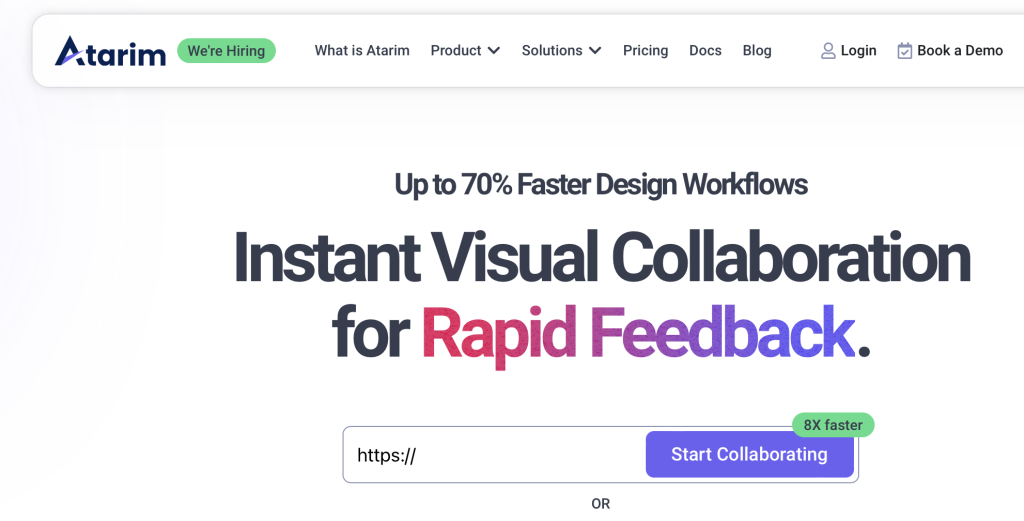
Atarim is perfect for designers who want better collaboration and feedback from clients during the design process. Instead of vague email comments, Atarim allows clients to click directly on a design or webpage and leave specific notes. This makes feedback easier to understand and act on.
It works great for web designers, brand designers, or anyone who needs approval or input before final delivery. You can upload design files, screenshots, or live URLs and get fast, actionable feedback. Everything is organized in one place so nothing gets lost.
Atarim also has task tracking, so you can assign action items, prioritize revisions, and stay on top of what’s done and what still needs fixing. It saves time, reduces confusion, and keeps both you and your client aligned on expectations.
If you’ve ever been frustrated by unclear change requests, Atarim will make your workflow feel more like a conversation than a guessing game.
Figma

Figma is more than a design tool. It’s a real-time collaboration platform built for UI, web, and brand designers. The best part? You and your client can work in the same file at the same time from any browser. No downloads. Just a link.
You can create interface mockups, brand guides, presentations, or any design system. Clients can view your work, leave comments, and even inspect assets if they need to hand things off to a developer.
Figma also allows you to organize files in pages and frames, making it easy to keep everything tidy and accessible. Exporting assets is quick and permissions are fully controllable.
If you want to speed up the review process and make your workflow feel collaborative rather than transactional, Figma is a powerful choice. It’s especially valuable for digital product designers and branding teams working remotely.
Adobe Creative Cloud

Adobe Creative Cloud is a classic in the design world, and for good reason. It brings together tools like Photoshop, Illustrator, InDesign, and Adobe XD, all backed by cloud storage that makes sharing files seamless.
With Creative Cloud Libraries, you can store and organize assets like logos, fonts, and color palettes. These libraries can be shared across apps and teams, so everyone always uses the latest version.
You can send clients links to preview files, comment on them, or even edit them if they also use Adobe. It’s great for handing over layered source files, templates, or large-format projects with high-resolution graphics.
Adobe Creative Cloud is especially useful when working on branding systems that require detailed assets in vector, raster, and print formats. While it’s a bit more technical than some tools on this list, it offers unmatched depth for full-service creatives.
Dropbox

Dropbox remains one of the simplest yet most reliable file sharing tools for designers. It works well for everything from final deliverables to mood boards and work-in-progress files. You can organize brand files into folders, subfolders, and shared links with set permissions.
The desktop sync feature ensures that changes to local files are updated in the cloud automatically. Clients can download files without needing to create an account, and you can receive alerts when files are viewed or downloaded.
One feature designers love is Dropbox’s integration with tools like Slack, Adobe, and Figma. You can preview files directly in the app, and organize them in a clean, professional-looking environment.
It’s not flashy, but Dropbox is dependable, fast, and widely understood by clients, which makes it a practical option for file delivery and backup.
Google Drive

Google Drive is one of the most accessible tools for sharing brand files, especially when working with clients who may not be tech-savvy. It allows you to organize brand assets into folders, set custom permissions, and share links with full control over who can view or edit.
Designers often use Drive to deliver final files like logos, brand manuals, or presentations. The built-in preview feature supports most common formats, so clients can check files before downloading.
Because it integrates with Google Docs, Sheets, and Slides, it’s also useful for sharing content calendars, asset lists, or collaborative feedback documents alongside the visual work.
While it may not offer branding or creative presentation like some other tools, it’s familiar, fast, and free to start. If you need something simple and effective that works across devices, Google Drive is a solid go-to for many creative professionals.
WeTransfer Pro

WeTransfer Pro is ideal for designers who need to send large design files with style. It lets you upload files up to 200 GB in size and send them with branded email templates and custom download pages.
The platform’s clean interface is quick to navigate, and you can track who has downloaded your files. Clients don’t need to sign up for anything. They click the link and receive exactly what you sent, without delay or confusion.
With WeTransfer Pro, you can also save file sets as “boards,” which act like branded portals for different clients or projects. This gives your hand-off process a polished feel without needing to build out a full asset library.
If you’re sending final deliverables like raw video files, layered PSDs, or large image folders, WeTransfer Pro makes you look professional and saves time for everyone involved.
InVision
InVision is a go-to platform for prototyping and sharing interactive designs. It’s built for digital designers who want clients to experience how a website or app will look and feel before development begins.
With InVision, you can upload static designs and turn them into clickable prototypes. This helps clients understand layout, flow, and function without needing any code. Clients can leave comments on specific elements, which keeps feedback actionable and easy to follow.
InVision also includes Freehand, a collaborative whiteboard for brainstorming ideas or mapping workflows with your team or client.
Designers who use Sketch, Photoshop, or Adobe XD can sync their files directly to InVision for quick handoffs. It’s especially helpful for UI and UX professionals looking to showcase their work beyond just a flat image.
For design presentations and interactive review sessions, InVision offers a clean, user-friendly way to bridge creativity and communication.
Microsoft OneDrive
Microsoft OneDrive is a practical choice for designers working with clients in larger organizations, especially those already using Microsoft 365. It offers secure cloud storage with tight integration into Word, Excel, PowerPoint, and Outlook.
For file sharing, OneDrive allows you to control access, set expiration dates on shared links, and track downloads. Clients can preview files directly in their browser, and real-time collaboration is supported for documents and presentations.
While it may not be tailored for visual design like Figma or InVision, it’s useful when your project includes presentations, documentation, or any Office-based assets.
OneDrive also works well when collaborating with marketing or brand teams who manage content across departments. If your design work is part of a larger business ecosystem, this tool makes it easier to align with other teams, centralize important assets, and maintain organized file structures within a familiar corporate environment.
Its built-in security features and Microsoft-native functionality make it a dependable option for creatives working with enterprise-level clients who prioritize consistency, compliance, and reliability.
Loom

Loom is a game-changer for designers who want to walk clients through their work without scheduling live meetings. With Loom, you can record your screen and voice to explain brand files, design choices, or even guide clients through how to use their new assets.
It’s especially useful during hand-off. Instead of writing long instructions, you can show the client exactly where to find their logo files, how to apply their brand guidelines, or how to edit templates. Clients can watch on their own time, leave comments, and revisit videos whenever they need a refresher.
Loom videos can be shared instantly via link, and you get notifications when someone views them. It’s also great for capturing feedback—clients can respond with their own video or comments.
If you’re looking to add a personal touch and reduce back-and-forth emails, Loom makes client communication feel more human, clear, and efficient.
Final Thoughts and Recommendations
Choosing the right tool to share brand files isn’t just about storage. It’s about creating a smooth, professional experience for your clients from start to finish. Whether you need real-time feedback, organized asset libraries, or a quick way to send large files, the tools listed above offer everything a modern designer needs.
Start by picking two or three tools that fit your workflow. For example, pair Brandy for brand guidelines, Figma for collaboration, and Loom for video walkthroughs.
The easier you make the hand-off, the more value your clients will see in your work—and that’s what great design delivery is all about.

