

Digital assets are everywhere, but most teams only realize their importance when something goes missing, outdated, or misused. A digital asset is not just a file stored on a laptop or drive. It is anything digital that holds value and can be reused to support branding, communication, marketing, operations, or revenue.
This includes images on your website, videos shared with customers, brand logos used by partners, design files used by teams, and even internal documents that guide decision making. When these assets are organized and used intentionally, they help teams move faster and stay consistent. When they are scattered, they slow everything down.
In this guide, you will learn what digital and online assets really are, how they differ from simple files, and see clear examples of the most common asset types businesses rely on today. The goal is not just to list assets but to help you recognize which digital items truly create value for your brand.
What Is a Digital or Online Asset?
A digital asset is any digital item that can be owned, used, shared, or reused to create value. That value might be financial, operational, legal, or brand related. An online asset is similar, but usually refers to assets that live on the internet or are used publicly, such as websites, social media content, or downloadable resources.
Not every digital file is automatically an asset. A file becomes an asset when it serves a purpose beyond storage.
Digital Assets vs Online Assets
Digital assets include both internal and external files. A logo file saved on a design team computer is a digital asset. The same logo published on a website or used in an ad becomes an online asset. The difference is mostly about visibility and usage, not ownership.
Online assets are usually customer facing, while digital assets can be internal, external, or both.
When a File Becomes a Real Asset
A photo sitting unused in a folder has no real value. That same photo used on a careers page to attract new hires becomes a brand asset. A document saved once and never referenced is just a file. A document reused across teams to guide messaging or compliance becomes an operational asset.
Value comes from usage, not existence.
Main Categories of Digital Assets Businesses Use
Digital assets generally fall into a few broad categories. Understanding these categories helps teams organize assets more effectively and avoid mixing unrelated files together.

Marketing and Brand Assets
These are the most visible digital assets. They include logos, images, videos, presentations, ebooks, ads, and social media content. These assets directly shape how a brand looks and sounds to the world.
Financial and Transactional Assets
Invoices, receipts, reports, pricing sheets, and financial models are also digital assets. They may not be public, but they hold significant operational value.
Legal and Compliance Related Assets
Contracts, licenses, brand usage rights, consent forms, and compliance documents fall into this category. These assets protect the business and ensure proper use of content and branding.
Personal and Internal Team Assets
Internal training materials, onboarding documents, process guides, and internal presentations also count as digital assets when they support team efficiency and consistency.
For the rest of this guide, the focus will be on marketing and brand related digital assets since they are the most commonly shared and mismanaged.
Visual Brand Assets That Shape First Impressions
Visual assets are often the first interaction someone has with a brand. They create recognition, trust, and emotional connection long before a word is read.
Photos and Image Libraries
Photos are foundational brand assets. This includes product images, team photos, lifestyle shots, and custom photography used across websites and campaigns. When images are consistent in style, lighting, and tone, they help establish a recognizable brand identity.
A curated image library allows teams to reuse approved visuals instead of constantly sourcing new ones. This saves time and keeps branding aligned.
Common file types include JPG, PNG, and TIFF.
Logos and Logo Variations
A logo is one of the most valuable digital assets a company owns. It represents the brand in its simplest form. Most brands have multiple logo variations, such as full logos, icon versions, light and dark versions, and format specific files.
Without clear organization, teams often use outdated or incorrect logos, leading to inconsistent branding.
Common file types include PNG, SVG, EPS, and JPG.
Brand Colors and Typography Files
Fonts and color palettes are not just design choices. They are reusable brand assets. Typography files ensure text appears consistently across platforms, while color codes help maintain visual harmony.
When these assets are not documented or centralized, teams guess, and brand consistency suffers.
Common file types include OTF, TTF, and WOFF.
Icons and UI Graphics
Icons help guide users through websites, apps, and dashboards. They highlight features, reinforce messaging, and improve usability. When icons follow a consistent style, they strengthen visual identity while improving user experience.
Icons are small assets, but their impact is significant.
Common file types include SVG and PNG.
Content Assets That Drive Marketing and Growth
Content based digital assets are designed to educate, persuade, and convert. These assets often have a long lifespan and can be reused across multiple channels.

Videos for Marketing and Education
Videos are powerful digital assets because they combine visuals, audio, and storytelling. Businesses use videos for product demos, tutorials, brand stories, social media, and internal training.
A well produced video can be repurposed across platforms and campaigns, increasing its long term value.
Common file types include MP4 and MOV.
Ebooks Guides and Downloadable Resources
Ebooks and guides are high value assets often used for lead generation. They go deeper than blog posts and provide structured information in exchange for contact details.
Once created, these assets can support marketing for months or even years with minimal updates.
Common file type is PDF.
Infographics and Visual Explainers
Infographics turn complex information into easy to understand visuals. They are ideal for breaking down data, processes, or comparisons in a way that is quick to scan and easy to share.
These assets are often reused in blogs, presentations, and social media posts.
Common file types include PNG and JPG.
Technical and Structured Digital Assets Teams Often Overlook
Not all digital assets are visual or customer facing. Some of the most valuable assets live behind the scenes and quietly support consistency, efficiency, and scale.
Code Snippets and Reusable Components
Code can be a digital asset when it is reused intentionally. This includes website components, layout structures, styling elements, and interactive features that appear across multiple pages or products.
For example, a reusable table of contents component across blog posts ensures consistency and saves development time. When teams store and document these snippets properly, they reduce repetitive work and prevent inconsistencies.
Common file types include HTML, CSS, JavaScript, and PHP.
Templates Spreadsheets and Calculators
Templates are digital shortcuts. Spreadsheets used for budgeting, project planning, pricing estimates, or ROI calculations can deliver real value to both internal teams and customers.
Customer facing calculators help users make decisions faster, while internal templates keep processes consistent. When these files are reused regularly, they become assets rather than temporary tools.
Common formats include Excel files and Google Sheets.
Sketches Wireframes and Early Design Files
Sketches and wireframes capture ideas before they become final products. In industries like fashion, architecture, and product design, these files are essential for collaboration and iteration.
Even rough drafts hold value because they document decisions and creative direction. When teams lose these files, they often repeat work that was already done.
Common file types include AI, EPS, and PDF.
Digital Assets vs Physical Assets
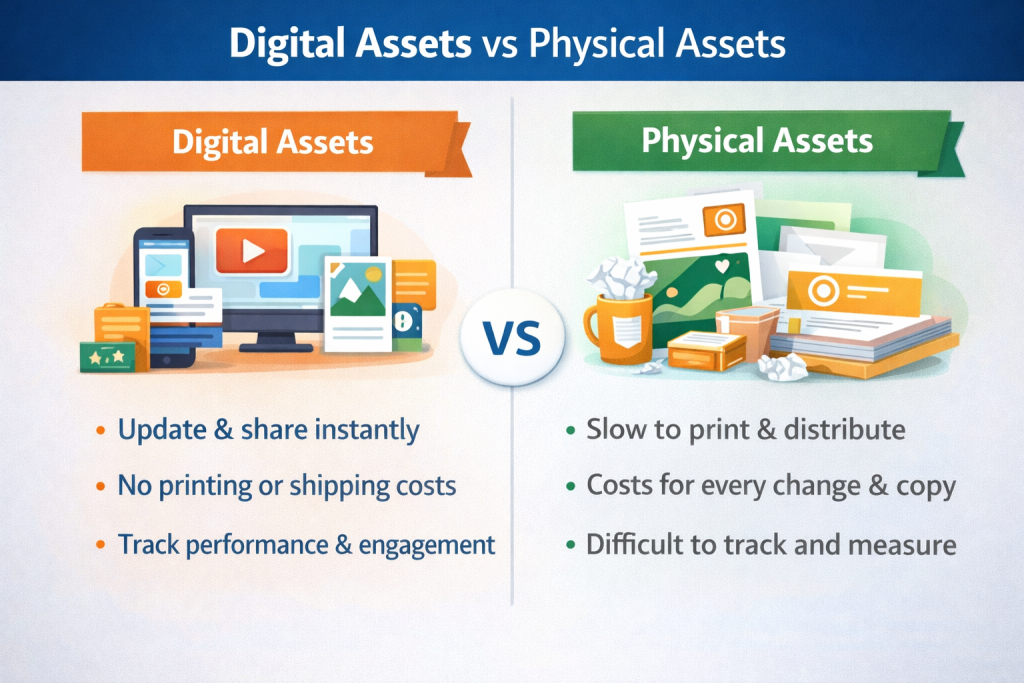
Physical marketing materials once dominated branding. Today, digital assets offer advantages that physical assets cannot match.
Speed Scalability and Accessibility
Digital assets can be shared instantly with teams across the world. A single update can be applied everywhere at once, eliminating delays caused by printing or shipping.
This accessibility supports remote work and faster collaboration.
Cost Efficiency and Sustainability
Digital assets reduce printing, storage, and distribution costs. They also align better with sustainability goals since updates do not require reprinting materials.
Brands can refresh messaging or visuals without wasting resources.
Tracking Performance and Usage
Unlike physical assets, digital assets can be measured. Teams can track engagement, downloads, views, and usage to understand what performs well.
This data helps guide smarter marketing decisions.
How Digital Assets Create Long Term Business Value?
Digital assets create long term business value when teams treat them as shared resources instead of one time files. Every logo, image, video, or document represents time, money, and creative effort. When teams organize assets and make them easy to reuse, they eliminate duplicate work and move faster. Designers do not recreate visuals that already exist. Marketers launch campaigns without hunting for files. Sales teams stay aligned with brand messaging.
Consistency is where the real value compounds. When approved assets are used across websites, emails, ads, and presentations, the brand starts to feel familiar and trustworthy. Customers recognize it instantly. Partners know what to use and what to avoid.
Over time, this consistency strengthens brand equity. Fewer mistakes happen. Fewer corrections are needed. The business saves resources while building a stronger and more reliable presence across every touchpoint.
How to Make Digital Assets Easy to Find and Reuse?
Creating assets is only half the work. If teams cannot find them, their value disappears.
Metadata and Naming Conventions
Metadata adds context to assets. This includes titles, descriptions, usage notes, ownership, and creation dates. While filenames matter, metadata makes assets searchable at scale.
Taxonomy and Folder Logic
A clear structure helps users navigate asset libraries intuitively. Grouping assets by type, campaign, or function reduces confusion and speeds up discovery.
Tags Keywords and Image Recognition
Tags allow assets to be searched by topic, purpose, or theme. Image tagging adds another layer by making visuals searchable using descriptive keywords.
Together, these methods transform static folders into usable libraries.
Managing Digital Assets at Scale Without Chaos
As teams grow, shared drives and email attachments stop working. Files get duplicated, overwritten, or lost. Teams waste time searching, recreating, or guessing which version is correct.
Centralized management becomes essential. A single source of truth ensures everyone works from the same approved assets and guidelines.
This is where structured digital asset management plays a critical role in maintaining order as brands scale.
How a Digital Asset Management System Supports Brand Consistency?
A digital asset management system helps teams store, organize, and control access to assets. Version control ensures outdated files are not used. Permissions protect sensitive assets while allowing easy sharing.
Brand guidelines live alongside assets, making correct usage clear. Teams collaborate more confidently because they know they are using approved materials.
For growing brands, this consistency is not optional. It is foundational.
Conclusion: Why Every Growing Brand Should Treat Assets Like Investments?
Digital and online assets are more than files. They represent time, creativity, and strategic value. When treated casually, they create friction. When managed intentionally, they fuel growth.
By recognizing what qualifies as an asset, organizing it properly, and making it accessible, teams unlock faster workflows, stronger branding, and better collaboration.
In a digital first world, how you manage your assets often determines how well your brand scales.

